Introducing utt-balance and utt-project-summary: Alpha Release
This Thanksgiving, I did what any reasonable person would do: ate way too much turkey, fell into a food coma on the couch while watching football, and then (naturally) spent the rest of the evening writing plugins for command-line time trackers. You know, normal holiday stuff.
I’m excited to share the alpha release of two new plugins I’ve been working on for utt (Ultimate Time Tracker): utt-balance and utt-project-summary. These tools are designed to help you better understand where your time is going and maintain a healthier work-life balance.
utt-balance
Version: 0.1.0-rc.3 GitHub: https://github.com/loganthomas/utt-balance
What is it?
utt-balance is a quick time check that shows your worked time balance against daily and weekly targets. The name reflects its core purpose: supporting your work-life balance by helping you stay within your pre-allocated work time.
Why I built it
Work ebbs and flows; certain days are more demanding than others, and that’s okay. But having a quick visual check helps keep things on rails and reminds you to protect your time outside of work. I wanted a simple way to see at a glance whether I was under, at, or over my target hours for the day and week.
How it works
The plugin uses color coding to tell the story:
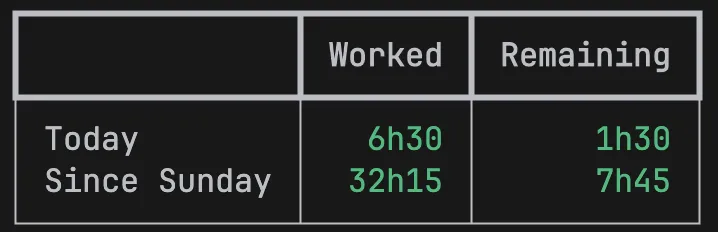
- Green: You’re under your target. You still have time remaining in your budget.
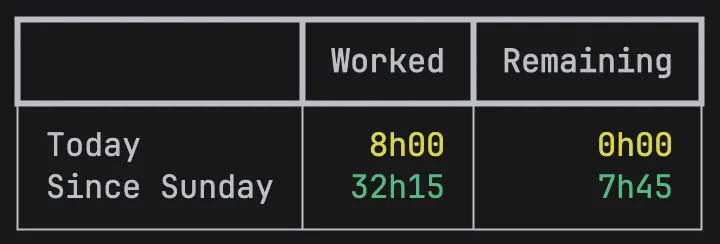
- Yellow: You’ve hit exactly your target. This is a warning that you’re about to dip into a deficit.
- Red: You’ve exceeded your allotted time. You’re over your daily or weekly target.
Example usage
# Install
pip install utt-balance

# Basic usage (8h/day, 40h/week, week starts Sunday)
utt balance

# Custom daily target (6-hour workday)
utt balance --daily-hrs 6

# Custom weekly target (35-hour work week)
utt balance --weekly-hrs 35

# Part-time schedule (4h/day, 20h/week)
utt balance --daily-hrs 4 --weekly-hrs 20
Under target (time remaining in your budget):
At target (you’ve hit your limit):
Over target (you’ve exceeded your budget):

utt-project-summary
Version: 0.1.0-rc.2 GitHub: https://github.com/loganthomas/utt-project-summary
What is it?
utt-project-summary provides a quick overview of how your time is distributed across different projects. It groups all activities by project and displays them sorted by total duration, giving you instant visibility into where your time is going.
Why I built it
While utt-balance focuses on work-life balance, utt-project-summary is designed for actual work tracking and productivity insights. When juggling multiple projects, it’s easy to lose track of where your hours are actually going. This plugin is perfect for quarterly reviews, yearly retrospectives, or just getting an at-a-glance view of your project distribution. It answers the question: “What am I spending most of my time on?” and helps you make data-driven decisions about how to allocate your time across projects.
How it works
The plugin groups your time entries by project and sorts them by duration (highest to lowest). You can optionally add percentages to see the distribution of your time, and filter by date ranges (day, week, month, or custom ranges).
Example usage
# Install
pip install utt-project-summary

# Basic usage (today's activities)
utt project-summary

# Show with percentages
utt project-summary --show-perc

# This week's summary
utt project-summary --week this

# Last month's summary
utt project-summary --month prev

# Custom date range
utt project-summary --from 2024-01-01 --to 2024-01-31
Example output:
Project Summary
---------------

backend : 4h30
frontend: 2h15
meetings: 1h45
docs    : 0h30

Total   : 9h00
With percentages:
Project Summary
---------------

backend : 4h30 ( 50.0%)
frontend: 2h15 ( 25.0%)
meetings: 1h45 ( 19.4%)
docs    : 0h30 (  5.6%)

Total   : 9h00 (100.0%)
Get Involved
Both plugins are open source and contributions are welcome! If you find bugs, have feature requests, or want to contribute code, please open an issue or submit a pull request on GitHub:
These are alpha releases, so your feedback is especially valuable as I continue to refine and improve these tools.
Try Them Out
If you’re already using utt, installation is simple:
pip install utt-balance
pip install utt-project-summary
Both plugins integrate seamlessly with utt’s native plugin API; no additional configuration needed.
Happy time tracking, and here’s to maintaining that work-life balance in the years to come!